
 English
 Lietuviškai
 Dansk
 Deutsch

Tuesday. Peter spent the morning at site A, the afternoon at site B, and in the evening “popped by” site C to pick up some tools. In the evening the manager asks: “How many hours went into each site?” Peter starts creating memories. The memories create an answer.
In short: when a team jumps between places, record the hours at each site separately, not on one combined line. Then you know where the time and the money went.
Why hours by site matter
- For invoices. The client pays for a specific site, so they need the hours for that site.
- For costs. If you know what a site cost, you can price your next jobs more accurately.
- For planning. You see which sites eat the most time and where people are missing.
What usually goes wrong
- The whole day is written against one site, although half of it was spent somewhere else.
- Sites are named differently: “5 Main St”, “Main Street 5” and “that house by the shop”.
- Travel between sites is not recorded anywhere, and nobody knows what to charge it to.
- You learn about an exceeded hours limit only when the job is already finished.
Four simple habits
One site, one name. Agree on what each site is called and use only that name.
Clock in on arrival. A QR code at the entrance lets people start work in a few seconds and assigns the hours to the site straight away.
When moving from place to place, register the new site. Then each one gets its share of the hours.
A weekly review. On Friday, look at which site has “ballooned” while there is still time to change something.
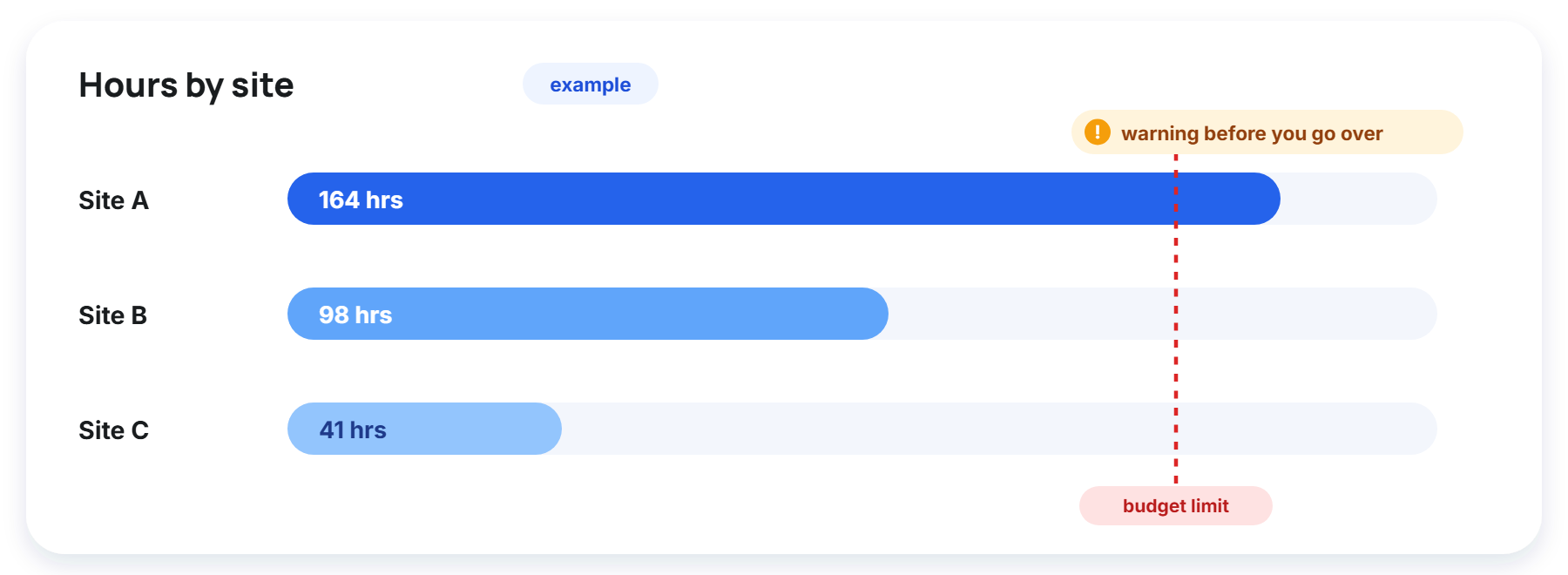
A small example
Peter’s week might look like this: site A shows 20 hours, site B 14 and site C only 6, mostly carrying tools back and forth. If all of that were one combined “40 hours” line, you would not know that site C needs not another person but a better plan for getting those tools there.
When hours by site are visible every week, such things come out on their own, not at the end of the month in a quarrel over the invoice.
How Estimy does it
Employees start work at each site separately, and the manager sees the hours by site. With the Labor costs module you also see what each site’s hours cost, and the budget warns you before you go over.
The figures in the picture above are an example, but the principle is the same: the budget limit and the warning arrive before the invoice does.